
CarX Drift Racing 3
CarX TechnologiesRacing
4.51.04K Reviews
- Version
- 1.16.0
- Installs
- 5.00M
- Age Rating
- Everyone
Screenshots
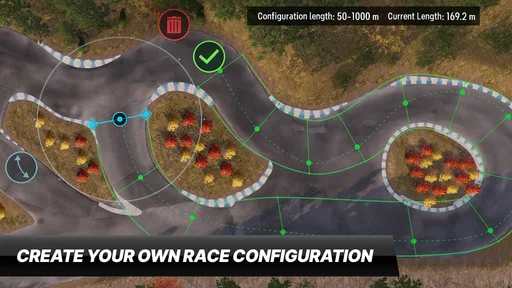
Our Review of CarX Drift Racing 3
 Analysis by Appyee
I approached CarX Drift Racing 3 as a first-time player rather than someone chasing a perfect score, and that is the right mindset for getting started. This is a racing game built around controlled slides, not simply reaching the finish line first. My early runs felt scrappy, but the appeal clicked once I began treating each corner as a small timing challenge: turn in, let the car rotate, then try to hold the slide instead of fighting it.
What to expect from a drift-focused racer
The basic pleasure here is different from the one I get from a conventional circuit racer. In a typical racing game, I focus on braking points, clean lines, and keeping speed through a bend. Here, I’m trying to make the car move sideways with intention. A messy slide can cost control, while a smooth one feels like a small win even before I finish a run. That focus gives each attempt a clear purpose, though it also means players who mainly want straightforward point-to-point racing may prefer a more traditional driving game.
CarX Technologies has made a game that puts drifting at the center rather than treating it as a brief stunt. The store describes a competitive atmosphere, and that pressure fits the premise: getting the car around a corner is only part of the challenge; making the movement look and feel controlled is what keeps me trying again. The game is free to download and rated for Everyone, so it is easy to try, while optional in-app purchases range from $1.99 to $79.99 per item. I’d treat those purchases as optional spending, not as a reason to rush through the early learning stage.
A calmer first setup makes learning easier
When I first open a driving game, I’m tempted to change every setting and customize everything at once. I wouldn’t do that here. Start with one control method, take a few runs, and change only what feels uncomfortable. The available choices—tilt, on-screen buttons, and a steering wheel—make the game approachable for different habits, but switching among them repeatedly makes it harder to tell whether a mistake came from my timing or my inputs.
I found tilt engaging because it makes steering feel physical, but it isn’t automatically the best choice for everyone. If you play while commuting, sitting somewhere cramped, or holding your phone at an awkward angle, buttons or the on-screen wheel may be easier to manage. A useful first test is to repeat the same kind of corner with one control scheme before judging it. Keep the phone position steady too: otherwise, a small change in how you hold the device can feel like a change in the car’s handling.
The game’s current version is 1.10.0, and it runs on devices with Android 10 or later. Before settling into a longer session, I’d make sure the phone is comfortable to hold and that you have a quiet moment to focus. Drifting is more satisfying when I can pay attention to the car’s direction rather than peeking at the screen between other tasks.
Your first meaningful success is control, not perfection
For a newcomer, I’d define the first success as completing a corner with a deliberate slide, even if it isn’t elegant. That target is more useful than expecting an impressive run immediately. When I try to force a dramatic drift too early, I tend to overcorrect; a smaller, more controlled movement gives me a better chance to understand what my input is doing. Make one adjustment at a time and notice whether it helps the car stay pointed where you want to go.
A practical routine is to focus on one repeatable corner or section rather than judging an entire session by its best result. First, learn when to begin turning. Next, try to avoid making a second, panicked correction as soon as the car starts to slide. Then, if the run goes wrong, change either your steering timing or your control method—not both together. This isn’t a hidden shortcut; it’s simply a way to make practice informative instead of turning every attempt into guesswork.
That approach also answers the question many new players have: do you need drifting experience to enjoy it? No, but you do need patience for a mechanic that rewards practice. Someone who likes improving through repeated attempts should find a satisfying loop here. If you want a game that feels instantly effortless, or you get annoyed when a turn takes several tries to understand, this may not be the most relaxing choice.
Settling into a better rhythm
I see this section as the point where practice becomes more deliberate: instead of changing several things after a rough run, I focus on noticing one cause and making one adjustment. That small habit makes each session easier to learn from, and it sets up a clearer way to decide what to tackle next.
How to avoid the most common early confusion
One early source of frustration is expecting every slide to feel like a mistake-free racing line. Drifting asks for a different balance: the car is meant to move sideways, but I still need to guide that movement. If I react to every bit of movement with a large steering correction, I can make the car harder to control. Smaller, deliberate inputs are a better place to start, and I find it helps to judge a run by whether I understood what happened rather than whether it looked impressive.
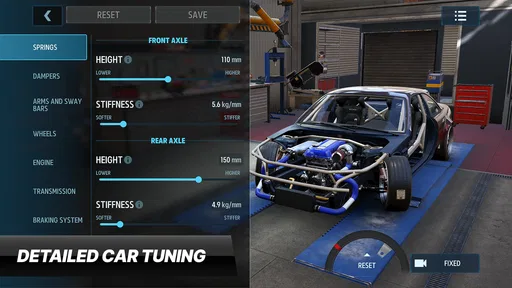
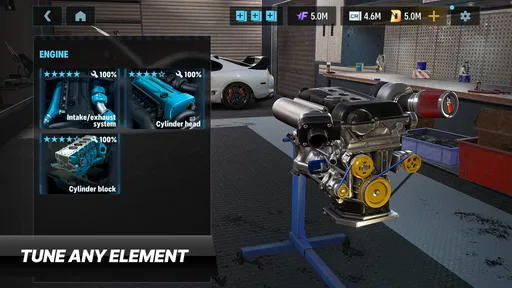
Another easy trap is assuming that a car setup will fix a technique problem. Customization can be appealing, and the game lets you tune a car toward qualities such as speed, handling, or drift power. But changing several things before learning how the car responds makes comparisons confusing. I’d keep a familiar setup while practicing, then make a single change and see whether it suits the way you drive. That simple habit makes tinkering more useful and prevents a string of adjustments from obscuring the cause of a bad run.
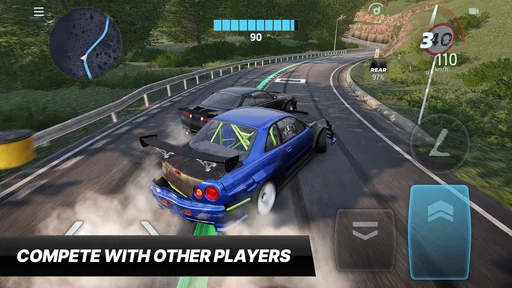
It’s also worth separating the game’s different attractions. Solo practice is the more comfortable place to build consistency; competing with other players adds pressure and makes a shaky technique more obvious. I wouldn’t use an online run as my first test of whether I understand drifting. When I can keep a slide under control on my own, competition becomes a more meaningful challenge rather than a confusing rush.
Where it fits among racing games
Compared with arcade racers that emphasize speed, traffic, or quick wins, this one asks me to pay closer attention to how the car moves through a turn. That focus is its strongest distinction, but it narrows its appeal too. If I’m in the mood to race cleanly around a course, a standard circuit racer is the better match. If I want a casual game that asks little of my hands or attention, a simpler pick-up-and-play racer may be less demanding.
It also suits a different mood from a simulation that expects players to study detailed driving technique before having fun. The drifting focus gives me a clear skill to work on without making the experience feel like a lesson in ordinary lap racing. Still, it isn’t a substitute for every kind of driving game: its central pleasure is refining a slide, so players who don’t enjoy repeating a corner to improve their control may find the loop limited.
The audience figures suggest it has found plenty of fellow players: it has over five million installs, a 4.5 average from around 42,000 ratings, and 881 written reviews. Those numbers are useful context, but they don’t tell me whether its particular style will suit you. I’d give more weight to the question of whether you enjoy learning a precise, expressive driving skill than to popularity alone.
A realistic way to fit it into a day
For a short evening break, I’d play a few focused runs rather than opening the game with the intention of mastering every option. Pick one control scheme, stay with a familiar car setup, and give yourself a small goal such as holding a cleaner slide through a corner. If the attempt goes badly, pause and change one thing next time. That keeps a ten-minute session from turning into a frustrating cycle of random tweaks.
Longer sessions make more sense when you want to explore customization or test yourself against other players. The trade-off is that tuning can eat into the time you meant to spend driving, especially if you keep changing several settings after each run. I’d save experimentation for when I’m curious about the car itself and use a stable setup when I’m trying to improve a specific driving habit.
Sound contributes to the sense of speed, with engine and tire effects giving the slides a satisfying edge. I enjoy that feedback, although the soundtrack and engine noise may not suit every public setting. If I’m playing somewhere quiet, I keep the sound low; the visual movement and steering response still give me enough to concentrate on the drive.
What the next step should be
After the first controlled slide, I’d move on to consistency before chasing dramatic runs. Use the same steering method and avoid changing your setup after every mistake. Once you can recognize when you’re turning too sharply or correcting too late, test a modest adjustment to the car and see whether it addresses that specific issue. The useful question isn’t “Which setup is best?” but “What is this change helping me do?”
When your runs feel predictable, trying multiplayer is a natural next step if competition sounds appealing. It gives your practice a different kind of pressure, but it isn’t compulsory for enjoying the game. Players who would rather work at their own pace can stick with solo challenges and customization; those who like measuring their control against others have a reason to keep refining it.
The game is free to start, but the in-app purchase range is broad enough that I’d decide on a spending limit before browsing optional items. There’s no need to make a purchase just to find out whether drifting clicks for you. First learn whether you enjoy the core driving loop; then decide whether any optional purchase is worth your own money.
My recommendation for the right kind of player
For me, this is a good fit if you enjoy learning through repetition, want a racing game with a distinct drifting focus, or like adjusting a car and then feeling the difference in your driving. Its broad control choices also make it easier to try a style that suits how you hold your phone. I’d recommend starting with a simple goal and giving yourself room to make imperfect runs; the satisfaction comes from gradual control, not instant mastery.
I’d skip it if you mainly want uncomplicated, fast races, dislike steering practice, or prefer games where each session quickly delivers a polished result. I’d also choose another kind of racer when I want a more relaxed experience that doesn’t ask me to interpret every turn. Those aren’t flaws so much as consequences of making drifting the main event.
As a racing game from CarX Technologies, it has a clear identity and a rewarding skill to explore, though the learning curve and temptation to tinker can slow down a first session. I’d install it for the driving, begin with one control method, and count a controlled corner as a real win. If that small improvement feels satisfying, there’s plenty of reason to keep practicing; if it feels like work, a more conventional racer will probably be a better match.
First impressions on the track
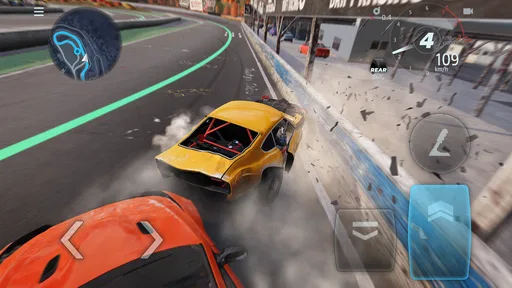
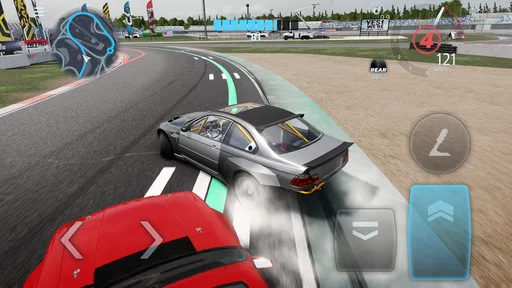
After downloading CarX Drift Racing 3, the first thing that caught my eye was the stunning graphics. Seriously, it feels like you're right there on the track. The cars are beautifully rendered, and the attention to detail is impressive. Whether it's the glint of the sun on the hood or the realistic smoke effects while drifting, the visuals are top-notch. It's clear that the developers put a lot of love into making this game look and feel as real as possible.
Gameplay and controls
Let’s talk about the gameplay, which is where the magic truly happens. The game is all about mastering the art of drifting. If you've played any of the previous titles in the series, you'll feel right at home. However, if you're new, there's a bit of a learning curve. But don't worry, the satisfaction of nailing that perfect drift is worth every bit of practice.
The controls are quite intuitive. You can choose between tilt, buttons, or a steering wheel on the screen, and each offers a slightly different way to experience the game. Personally, I found the tilt controls to be the most immersive, giving me that extra sense of being behind the wheel. The responsiveness is on point, allowing you to make those split-second decisions as you weave through turns.
Game modes and customization
One of the things I loved is the variety of game modes. From solo drift challenges to online multiplayer races, there's something for everyone. The multiplayer mode is particularly thrilling, pitting you against players from all over the world. It's a real test of your skills and a great way to show off your drifting prowess.
There's also a robust customization system. You can tweak your car to suit your style, whether that's focusing on speed, handling, or pure drift power. The range of options is impressive, and I spent a good chunk of time just tinkering with different setups.
Sound and music
No review would be complete without mentioning the sound design. The roar of the engines is music to any car enthusiast’s ears. The screech of the tires as you drift is satisfying, and the soundtrack keeps your adrenaline pumping throughout. It's the kind of game where you might just find yourself bobbing your head to the beat as you race.
One last thought
Overall, CarX Drift Racing 3 is a thrilling addition to the racing genre. It's got the looks, the feel, and the features to keep you hooked for hours. Whether you're a drifting veteran or a newbie looking to try something new, this game is definitely worth checking out. Just be prepared to lose track of time as you chase that perfect drift!
Verdict
Strengths of CarX Drift Racing 3
- Stunning graphics with realistic environments.
- Intuitive controls for smooth gameplay.
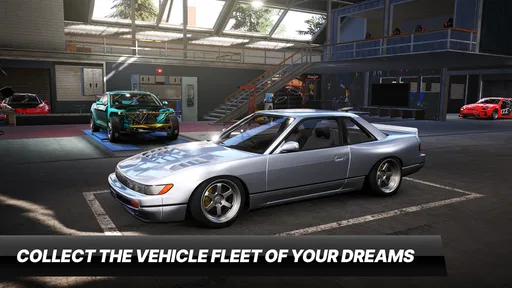
- Wide variety of cars to customize.
- Regular updates with new features.
- Engaging multiplayer mode with friends.
Limitations of CarX Drift Racing 3
- In-app purchases can be expensive.
- Requires constant internet connection.
- Some features locked behind paywall.
- Occasional connectivity issues in multiplayer.
- High battery consumption during gameplay.
Other Releases by CarX Technologies
View All


Similar Picks in This Category
View All
Hill Climb Racing
Fingersoft4.3

Dr. Driving
SUD Inc.4.2

Traffic Rider
skgames4.5

Asphalt 8 - Car Racing Game
Gameloft SE4.6

Race Master 3D: Car Racing
Beresnev Games4.6

Extreme Car Driving Simulator
AxesInMotion Racing4.3
Frequently Asked Questions
What is CarX Drift Racing 3 and how does it differ from previous versions?
CarX Drift Racing 3 is the latest installment in the popular CarX racing series, known for its realistic drifting mechanics and immersive gameplay. This version introduces enhanced graphics, improved physics, and new tracks, offering a more authentic drifting experience. Players can expect updated car models and customization options, making it a significant upgrade from previous versions.
Is CarX Drift Racing 3 available for both Android and iOS devices?
Yes, CarX Drift Racing 3 is available for download on both Android and iOS platforms. The game is designed to run smoothly on a wide range of devices, though newer models might provide a better experience with enhanced graphics and performance. Make sure to check the compatibility of your device before downloading.
What are the main features of CarX Drift Racing 3?
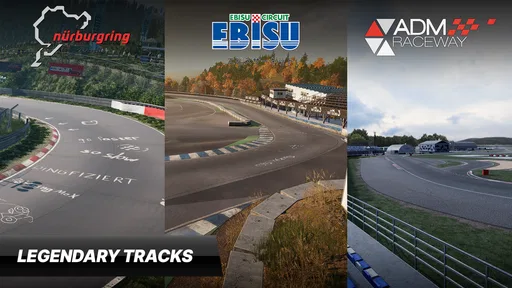
CarX Drift Racing 3 boasts a host of features, including a realistic physics engine, extensive car customization options, and a variety of tracks with different difficulty levels. The game also offers online multiplayer modes, allowing players to compete globally. Additionally, the game includes a career mode, providing a structured progression system for players.
Are there in-app purchases in CarX Drift Racing 3?
Yes, CarX Drift Racing 3 includes in-app purchases. These can be used to unlock new cars, customization packs, and other premium features. While the game is free to download, these purchases can enhance the gaming experience. Players should be aware of this option, especially if they prefer a fully free-to-play experience.
What customization options are available for cars in CarX Drift Racing 3?
CarX Drift Racing 3 offers extensive customization options for cars. Players can modify the appearance of their vehicles with different paint jobs, decals, and rims. Additionally, there are performance upgrades available, such as engine enhancements and suspension tuning, allowing players to tailor their cars to their preferred driving style.
Play our best games!


